A retail point of sale that does the basics properly
Everything on this page is in the current version of Eppetech POS. Where something isn't available yet, it's marked as such.
Selling at the till
Checkout and barcode scanning
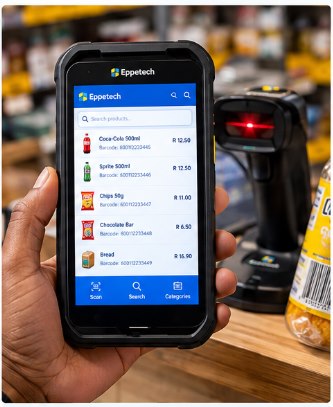
Serve customers quickly: scan, search or tap, and the item is in the cart.
Scan barcodes
Use a keyboard-wedge barcode scanner, or the built-in scanner on a compatible Android POS terminal.
Search or tap
Search by product name or code, or choose an item from the product grid.
Several barcodes per product
A product can carry more than one barcode, for example a single item and a pack.
Selling at the till
Cart and discounts
Keep the sale right before the customer pays.
Change quantities
Add, remove and adjust items in the cart.
Line and sale discounts
Give a discount on a line or on the whole sale, only if your role allows it. The server checks the permission on every sale, so hiding a button is never the only safeguard.
VAT shown clearly
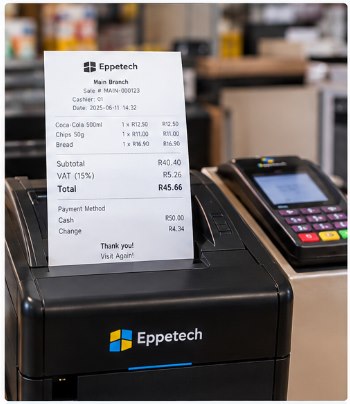
Totals work for VAT-inclusive or VAT-exclusive pricing, with the VAT shown on the sale.
Payments
Cash, card, EFT and split payments
Take payment the way your customer wants to pay.
Cash with change
Enter the amount tendered and the change due is calculated for you.
External card terminals
Take the card payment on your card terminal, then record its approval reference in Eppetech POS. Card numbers and card data are never stored.
EFT and other methods
Record EFT and other payment methods your business uses.
Split payments
Split one sale across more than one payment method.
Eppetech POS does not process card payments itself; it records the result from your card terminal. Eppetech POS shows a receipt preview and can reprint it on screen. Printing to a physical receipt printer is not connected yet.
Till control
Cash sessions and till reconciliation
Know how much cash should be in the till at any time.
Open with a float
Each cashier opens a cash session at their branch with the opening float.
Expected cash
Cash sales and refunds update the cash the till should hold.
Close and count
Close the session by entering the counted cash; the variance against the expected amount is recorded.
Cash in and cash out on screenNot available yet
The platform already records authorised cash in and cash out against a session, but there is no till screen for it yet.
Keep selling
Offline operation on POS terminals
A dropped connection doesn't have to stop the queue.
Sell while offline
The POS terminal app keeps taking sales without a connection and sends them when it is back online.
Catalogue on the device
After the first download, the product catalogue is kept on the terminal and refreshed with changes.
See what is waiting
The device's outbox shows sales waiting to sync and any the server rejected.
Nothing rewritten silently
Price changes or a closed cash session found while syncing are flagged on the sale for review, not changed behind your back.
No double sales
Each sale and payment carries its own identifier, so a retried submission is recorded only once.
Reports, stock levels and other terminals' sales only update once the terminal is back online.
After the sale
Sales history, voids and returns
Find any sale and put things right when a customer comes back.
Search sales
Filter sales by date, branch and sale number. Cashiers see their own sales.
Sale details and receipt
See items, VAT and payments, with a receipt preview you can reprint on screen.
Voids with a reason
Void a whole sale with a reason; stock and cash are reversed and the void is recorded.
Partial returns
Return some items, line by line. Mark each item as saleable (back into stock) or damaged (refunded, not restocked).
Fair refunds
Refunds are worked out from what the customer paid, and cash refunds come from your own open till. Card and EFT refunds are recorded with their reference.
No double refunds
A retried return is never refunded twice, and a sale with returns can't then be voided.
Eppetech POS shows a receipt preview and can reprint it on screen. Printing to a physical receipt printer is not connected yet.
Oversight
Business dashboard and reports
See how today is going without waiting for month-end.
Today at a glance
Sales count, takings and VAT for today, plus takings by payment method.
Stock and devices
The number of low-stock items and the status of your POS terminals.
Reports
Sales summaries for today and the last 7, 30 or 90 days, with discounts, voids and your stock position.
Stock and terminal management happen in the separate Eppetech Inventory and Eppetech Device Manager apps, linked from the dashboard.
Accountability
Branches, roles and audit trails
Grow from one counter to several branches with the right people in the right places.
Businesses and branches
Run more than one branch, and limit staff to the branches they work at.
Roles
Owner, manager, cashier, stock controller and support roles, each with its own permissions.
Audit trail
Sales, voids, returns, cash movements and price changes are recorded with who did them and when.
Being clear about it
Not available yet
Printing to a physical receipt printer. Receipts can be previewed and reprinted on screen.
On-screen cash in and cash out. The platform records them; the till screen for it is still to come.
Built-in card processing. Card payments are taken on your own card terminal and their approval reference is recorded.
Cash drawers and label printers. Not connected to the POS yet.